IS-IS
ISIS یک پروتکل مسیریابی است که در ISO10589، RFC 1195 و RFC 5308 توصیف شده است. ISIS یک IGP است. در مقایسه با ISIS، RIP میتواند پشتیبانی شبکه مقیاسپذیر و زمانهای همگرایی سریعتر مانند OSPF را ارائه دهد. ISIS به طور گسترده در شبکههای بزرگ مانند ISP و شبکههای backbone carrier استفاده میشود.
ISIS router
برای شروع فرآیند ISIS باید روتر ISIS را مشخص کنید. در حال حاضر، isisd از چندین فرآیند ISIS پشتیبانی نمیکند.
- router isis WORD [vrf NAME]
فرآیند ISIS را با مشخص کردن دامنه ISIS با ‘WORD’ فعال یا غیرفعال میکند. isisd هنوز از چندین فرآیند ISIS پشتیبانی نمیکند اما باید نام فرآیند ISIS را مشخص کنید. نام فرآیند ISIS ‘WORD’ سپس برای اینترفیس استفاده میشود (به دستور
ip router isis WORDمراجعه کنید).
- net XX.XXXX. ... .XXX.XX
Network Entity Title (NET) را در فرمت ISO تنظیم/لغو میکند.
NET شامل چند بخش میباشد:
47.0023: Area ID معادل است با area در OSPF
0000.0000.0000.0000.0000.0000.1900.1111: System ID که باید در کل شبکه منحصر به فرد باشد. چون سایز آن با MAC برابر است معمولاً از MAC روتر به جای آن استفاده میشود.
نکته
این بخش میتواند به صورت خلاصه و تنها با استفاده از دو بایت (8 رقم) نیز تنظیم شود.
00: مشخص میکند که device یک روتر است.
- hostname dynamic
پشتیبانی از dynamic hostname را فعال میکند.
- area-password [clear | md5] PASSWORD
رمز عبور احراز هویت برای یک area را به صورت متن ساده یا md5 پیکربندی میکند.
- domain-password [clear | md5] PASSWORD
رمز عبور احراز هویت برای یک domain را به صورت متن ساده یا md5 پیکربندی میکند.
- attached-bit [receive ignore | send]
Attached bit را برای ترافیک inter-area تنظیم میکند:
receive: اگر LSP با attached bit تنظیم شده دریافت شود، default route به neighbor ایجاد میکند
send: اگر روتر L1|L2 باشد، attached bit را در LSP ارسال شده به روتر L1 تنظیم میکند
- log-adjacency-changes
تغییرات در وضعیت adjacency را لاگ میکند.
- log-pdu-drops
هر PDU drop شده را لاگ میکند.
- metric-style [narrow | transition | wide]
فرمتهای بسته قدیمی (ISO 10589) یا جدید را تنظیم میکند:
narrow: استفاده از سبک قدیمی TLV ها با metric narrow
transition: ارسال و پذیرش هر دو سبک TLV در طول transition
wide: استفاده از سبک جدید TLV ها برای حمل metric وسیعتر. SoodarOS از این به عنوان مقدار پیشفرض استفاده میکند
- advertise-high-metrics
مقدار metric بالا را روی تمام اینترفیسها advertise میکند تا ترافیک را به آرامی از روتر خارج کند. مرجع: RFC 3277
برای narrow metrics، مقدار metric بالا 63 است؛ برای wide metrics، 16777215؛ برای transition metrics، 62.
- set-overload-bit
Overload bit را تنظیم میکند تا از هر ترافیک transit جلوگیری شود.
- set-overload-bit on-startup (0-86400)
Overload bit را در startup برای مدت زمان مشخص شده، بر حسب ثانیه تنظیم میکند. مرجع: RFC 3277
- purge-originator
شناسایی RFC 6232 purge originator را فعال یا غیرفعال میکند.
- lsp-mtu (128-4352)
حداکثر اندازه LSP های تولید شده را بر حسب بایت پیکربندی میکند.
- advertise-passive-only
فقط prefix های اینترفیسهای passive را advertise میکند.
ISIS Timer
- lsp-gen-interval [level-1 | level-2] (1-120)
حداقل فاصله بر حسب ثانیه بین تولید مجدد همان LSP را به صورت global، برای یک area (level-1) یا domain (level-2) تنظیم میکند.
- lsp-refresh-interval [level-1 | level-2] (1-65235)
فاصله refresh LSP را بر حسب ثانیه به صورت global، برای یک area (level-1) یا domain (level-2) تنظیم میکند.
- max-lsp-lifetime [level-1 | level-2] (360-65535)
حداکثر طول عمر LSP را بر حسب ثانیه به صورت global، برای یک area (level-1) یا domain (level-2) تنظیم میکند.
- spf-interval [level-1 | level-2] (1-120)
حداقل فاصله بین محاسبات SPF متوالی را بر حسب ثانیه تنظیم میکند.
ISIS region
- is-type [level-1 | level-1-2 | level-2-only]
رفتار روتر ISIS را تعریف میکند:
level-1: فقط به عنوان station router عمل کند
level-1-2: هم به عنوان station router و هم area router عمل کند
level-2-only: فقط به عنوان area router عمل کند
ISIS interface
- <ip|ipv6> router isis WORD
Adjacency ISIS را روی این اینترفیس فعال میکند. توجه داشته باشید که نام instance ISIS باید همانند نامی باشد که برای پیکربندی فرآیند ISIS استفاده شده است (به دستور
router isis WORDمراجعه کنید). برای فعال کردن IPv4،ip router isis WORDرا اجرا کنید؛ برای فعال کردن IPv6،ipv6 router isis WORDرا اجرا کنید.
- isis circuit-type [level-1 | level-1-2 | level-2]
نوع circuit را برای اینترفیس پیکربندی میکند:
level-1: فقط adjacency های Level-1 تشکیل میشوند
level-1-2: adjacency های Level-1-2 تشکیل میشوند
level-2-only: فقط adjacency های Level-2 تشکیل میشوند
- isis csnp-interval (1-600) [level-1 | level-2]
فاصله CSNP را بر حسب ثانیه به صورت global، برای یک area (level-1) یا domain (level-2) تنظیم میکند.
- isis hello padding
Padding را به بستههای IS-IS hello اضافه میکند.
- isis hello padding during-adjacency-formation
Padding را فقط به بستههای IS-IS hello در طول تشکیل adjacency اضافه میکند.
- isis hello-interval (1-600) [level-1 | level-2]
فاصله Hello را بر حسب ثانیه به صورت global، برای یک area (level-1) یا domain (level-2) تنظیم میکند.
- isis hello-multiplier (2-100) [level-1 | level-2]
ضریب برای Hello holding time را به صورت global، برای یک area (level-1) یا domain (level-2) تنظیم میکند.
- isis metric [(0-255) | (0-16777215)] [level-1 | level-2]
مقدار metric پیشفرض را به صورت global، برای یک area (level-1) یا domain (level-2) تنظیم میکند. مقدار حداکثر بستگی به این دارد که metric از narrow یا wide پشتیبانی میکند (به دستور metric-style [narrow | transition | wide] مراجعه کنید).
- isis network point-to-point
نوع شبکه را به ‘Point-to-Point’ تنظیم میکند (به طور پیشفرض broadcast است).
- isis passive
حالت passive را برای این اینترفیس پیکربندی میکند.
- isis password [clear | md5] <password>
رمز عبور احراز هویت (متن ساده یا encoded) را برای اینترفیس پیکربندی میکند.
- isis priority (0-127) [level-1 | level-2]
اولویت برای انتخاب Designated Router را به صورت global، برای area (level-1) یا domain (level-2) تنظیم میکند.
- isis psnp-interval (1-120) [level-1 | level-2]
فاصله PSNP را بر حسب ثانیه به صورت global، برای یک area (level-1) یا domain (level-2) تنظیم میکند.
- isis three-way-handshake
RFC 5303 Three-Way Handshake را برای adjacency های P2P فعال یا غیرفعال میکند. Three-Way Handshake به طور پیشفرض فعال است.
Showing ISIS information
- show isis [vrf <NAME|all>] summary [json]
اطلاعات خلاصه درباره ISIS را نمایش میدهد.
- show isis hostname
اطلاعات درباره node ISIS را نمایش میدهد.
- show isis [vrf <NAME|all>] interface [detail] [IFNAME] [json]
وضعیت و پیکربندی اینترفیس ISIS مشخص شده را نمایش میدهد، یا تمام اینترفیسها اگر اینترفیسی داده نشود، با یا بدون جزئیات.
- show isis [vrf <NAME|all>] neighbor [detail] [SYSTEMID] [json]
وضعیت و اطلاعات neighbor ISIS مشخص شده را نمایش میدهد، یا تمام neighbor ها اگر system id داده نشود، با یا بدون جزئیات.
- show isis [vrf <NAME|all>] database [detail] [LSPID] [json]
پایگاه داده ISIS را به صورت global، برای یک LSP id خاص بدون یا با جزئیات نمایش میدهد.
- show isis topology [level-1|level-2] [algorithm (128-255)]
مسیرهای توپولوژی IS-IS به Intermediate Systems را به صورت global، در area (level-1) یا domain (level-2) نمایش میدهد.
- show isis route [level-1|level-2] [prefix-sid|backup] [algorithm (128-255)]
جدول مسیریابی ISIS را که توسط آخرین محاسبه SPF تعیین شده است، نمایش میدهد.
Debugging ISIS
- debug isis adj-packets
بستههای مرتبط با Adjacency IS-IS.
- debug isis checksum-errors
خطاهای checksum LSP IS-IS.
- debug isis events
رویدادهای IS-IS.
- debug isis local-updates
بستههای بهروزرسانی محلی IS-IS.
- debug isis packet-dump
Dump بسته IS-IS.
- debug isis protocol-errors
خطاهای پروتکل LSP IS-IS.
- debug isis route-events
رویدادهای مرتبط با Route IS-IS.
- debug isis snp-packets
بستههای CSNP/PSNP IS-IS.
- debug isis spf-events
رویدادهای Shortest Path First IS-IS.
- debug isis spf-statistics
دادههای Timing و Statistic SPF IS-IS.
- debug isis spf-triggers
رویدادهای trigger SPF IS-IS.
- debug isis update-packets
بستههای مرتبط با Update.
- show debugging isis
نمایش اینکه کدام سطح debug ISIS فعال است.
سناریو ۱: پیکربندی پایه IS-IS
در سناریوی زیر قصد داریم مسیریابی پویا را با استفاده از پروتکل IS-IS در روترها تنظیم کنیم. فرض شده است که IP در اینترفیسها در بخش تنظیم IP در اینترفیس تنظیم شدهاند:
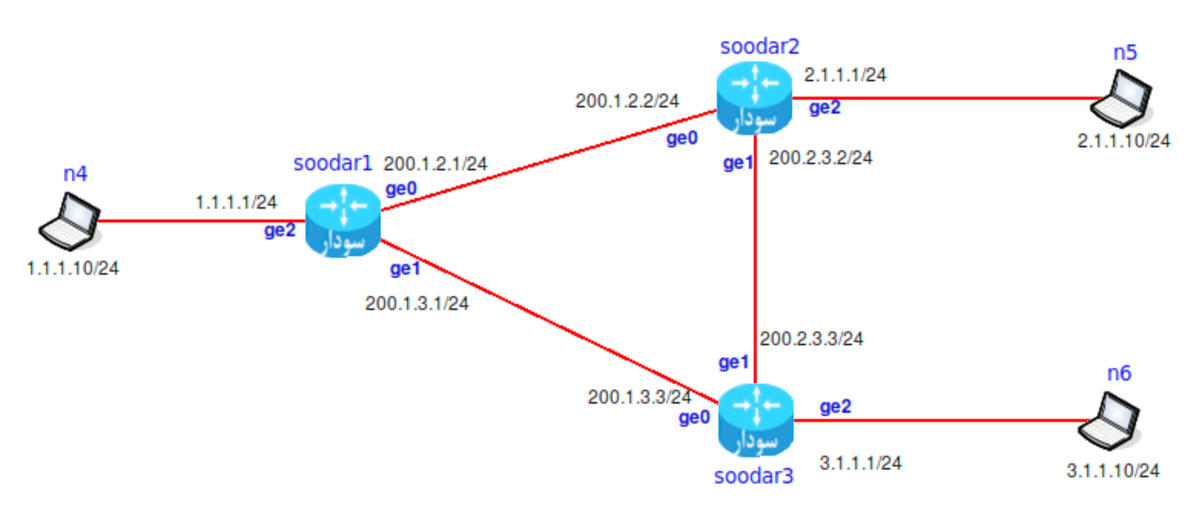
ایجاد یک instance از IS-IS با نام test
soodar1(config)# router isis test
تنظیم NET در IS-IS
soodar1(config-router)# net 47.0023.0000.0000.0000.0000.0000.0000.1900.1111.00
soodar1(config-router)# redistribute ipv4 connected level-1
بازنشر شبکههای connected توسط IS-IS
soodar1(config-router)# redistribute ipv4 connected level-1
نکته
توجه کنید level-1 مشخص میکند که شبکههای connected فقط در area محلی ارسال و توزیع شود و در area های دیگر ارسال نگردد. اگر از level-2 استفاده کنید در area های دیگر نیز توزیع خواهد شد و روترهایی که area id متفاوت با این روتر را دارند route به شبکههای connected شما را خواهند داشت.
تنظیم کردن اینترفیس
soodar1(config)# int ge0
soodar1(config-if)#  ip router isis test
soodar1(config-if)# q
soodar1(config)# int ge1
soodar1(config-if)#  ip router isis test
هر اینترفیسی که در روتر isis test قرار داشته باشد در جدول routing isis اضافه میشود و میتواند با دیگر اعضای شبکه ارتباط داشته باشد.
تنظیم soodar2 و soodar3
soodar2(config)# router isis test
soodar2(config-router)# net 47.0023.1900.2222.00
soodar2(config-router)# redistribute ipv4 connected level-1
soodar2(config-router)# q
soodar2(config)# int ge0
soodar2(config-if)#  ip router isis test
soodar2(config-if)# q
soodar2(config)# int ge1
soodar2(config-if)#  ip router isis test
----------------------------------------
soodar3(config)# router isis test
soodar3(config-router)# net 47.0023.1900.3333.00
soodar3(config-router)# redistribute ipv4 connected level-1
soodar3(config-router)# q
soodar3(config)# int ge0
soodar3(config-if)#  ip router isis test
soodar3(config-if)# q
soodar3(config)# int ge1
soodar3(config-if)#  ip router isis test
مشاهده جدول مسیریابی
پس از تنظیم کردن روترها جدول مسیریابی را بررسی میکنیم. مشخص است که شبکههای 2.1.1.0 و 3.1.1.0 توسط IS-IS مسیریابی شدهاند (حرف I مشخص کننده این است که این مسیر توسط IS-IS در جدول اضافه شده است):
soodar1# sh ip fib
Codes: K - kernel route, C - connected, S - static, R - RIP,
       O - OSPF, I - IS-IS, B - BGP, E - EIGRP, N - NHRP,
       T - Table, v - VNC, V - VNC-Direct, A - Babel, D - SHARP,
       F - PBR, f - OpenFabric,
       > - selected route, * - FIB route, q - queued route, r - rejected route

C>* 1.1.1.0/24 is directly connected, ge2, 00:01:59
I>* 2.1.1.0/24 [115/20] via 200.1.2.2, ge0, 00:01:37
I>* 3.1.1.0/24 [115/20] via 200.1.3.3, ge1, 00:01:37
C>* 200.1.2.0/24 is directly connected, ge0, 00:01:59
C>* 200.1.3.0/24 is directly connected, ge1, 00:01:59
I>* 200.2.3.0/24 [115/20] via 200.1.2.2, ge0, 00:01:37
بررسی عملکرد IS-IS
توجه
باید ارتباط شبکههای 1.1.1.0 و 2.1.1.0 و 3.1.1.0 برقرار باشد.
بررسی neighbor ها:
soodar1# show isis neighbor
Area 47.0023:
System Id      Interface   SNPA            State Holdtime Type     PRI
soodar2        ge0         0c:61:0c:83:00:01 Up    25       L1      64
soodar3        ge1         0c:61:0c:83:00:02 Up    25       L1      64
بررسی database:
soodar1# show isis database
Area 47.0023:
IS-IS Level-1 Link-State Database:
LSPID                  LSP Seq Num  LSP Checksum  LSP Holdtime  ATT/P/OL
soodar1.00-00          0x00000005   0x8a3f        1198           0/0/0
soodar2.00-00          0x00000004   0x7b2e        1195           0/0/0
soodar3.00-00          0x00000003   0x6c1d        1192           0/0/0
سناریو ۲: IS-IS با احراز هویت MD5
در این سناریو، IS-IS را با احراز هویت MD5 برای افزایش امنیت پیکربندی میکنیم. این سناریو برای شبکههای production که نیاز به امنیت دارند مناسب است.
پیکربندی روتر ۱
soodar1(config)# router isis FOO
soodar1(config-router)# net 47.0023.0000.0000.0000.0000.0000.0000.1900.0001.00
soodar1(config-router)# metric-style wide
soodar1(config-router)# is-type level-2-only
soodar1(config-router)# area-password md5 mysecretpass123
soodar1(config-router)# log-adjacency-changes
soodar1(config-router)# exit

soodar1(config)# interface ge0
soodar1(config-if)# ip router isis FOO
soodar1(config-if)# isis network point-to-point
soodar1(config-if)# isis circuit-type level-2-only
soodar1(config-if)# isis password md5 interfacepass456
soodar1(config-if)# exit
پیکربندی روتر ۲
soodar2(config)# router isis FOO
soodar2(config-router)# net 47.0023.0000.0000.0000.0000.0000.0000.1900.0002.00
soodar2(config-router)# metric-style wide
soodar2(config-router)# is-type level-2-only
soodar2(config-router)# area-password md5 mysecretpass123
soodar2(config-router)# log-adjacency-changes
soodar2(config-router)# exit

soodar2(config)# interface ge0
soodar2(config-if)# ip router isis FOO
soodar2(config-if)# isis network point-to-point
soodar2(config-if)# isis circuit-type level-2-only
soodar2(config-if)# isis password md5 interfacepass456
soodar2(config-if)# exit
نکات مهم:
area-password: رمز عبور برای احراز هویت در سطح area استفاده میشود
isis password: رمز عبور برای احراز هویت در سطح اینترفیس استفاده میشود
metric-style wide: استفاده از metric style جدید برای پشتیبانی از metric های بزرگتر
log-adjacency-changes: لاگ کردن تغییرات adjacency برای عیبیابی
بررسی وضعیت:
soodar1# show isis neighbor detail
Area 47.0023:
System Id      Interface   SNPA            State Holdtime Type     PRI
soodar2        ge0         0c:61:0c:83:00:01 Up    25       L2      64
  Area Address: 47.0023
  IP Address:   200.1.2.2
  IPv6 Address: Not configured
  Circuit Id:   01
  Format:       Phase V
  State Change: 00:05:23
سناریو ۳: IS-IS Multi-Level (Level-1-2)
در این سناریو، یک روتر Level-1-2 را پیکربندی میکنیم که میتواند هم در area محلی (Level-1) و هم در domain (Level-2) عمل کند. این برای روترهای مرزی بین area ها مناسب است.
توپولوژی
Area 47.0023 (Level-1)          Area 47.0024 (Level-1)
     |                                |
  [R1]                            [R3]
     |                                |
  [R2] (Level-1-2)              [R4] (Level-1-2)
     |                                |
     +--------[R5] (Level-2)----------+
پیکربندی روتر مرزی (R2)
R2(config)# router isis BACKBONE
R2(config-router)# net 47.0023.0000.0000.0000.0000.0000.0000.1900.0002.00
R2(config-router)# metric-style wide
R2(config-router)# is-type level-1-2
R2(config-router)# log-adjacency-changes
R2(config-router)# exit

R2(config)# interface ge0
R2(config-if)# ip router isis BACKBONE
R2(config-if)# isis circuit-type level-1
R2(config-if)# exit

R2(config)# interface ge1
R2(config-if)# ip router isis BACKBONE
R2(config-if)# isis circuit-type level-2-only
R2(config-if)# exit
پیکربندی روتر Level-1 (R1)
R1(config)# router isis BACKBONE
R1(config-router)# net 47.0023.0000.0000.0000.0000.0000.0000.1900.0001.00
R1(config-router)# metric-style wide
R1(config-router)# is-type level-1
R1(config-router)# exit

R1(config)# interface ge0
R1(config-if)# ip router isis BACKBONE
R1(config-if)# isis circuit-type level-1
R1(config-if)# exit
پیکربندی روتر Level-2 (R5)
R5(config)# router isis BACKBONE
R5(config-router)# net 47.0000.0000.0000.0000.0000.0000.0000.1900.0005.00
R5(config-router)# metric-style wide
R5(config-router)# is-type level-2-only
R5(config-router)# exit

R5(config)# interface ge0
R5(config-if)# ip router isis BACKBONE
R5(config-if)# isis circuit-type level-2-only
R5(config-if)# exit

R5(config)# interface ge1
R5(config-if)# ip router isis BACKBONE
R5(config-if)# isis circuit-type level-2-only
R5(config-if)# exit
بررسی توپولوژی:
R2# show isis topology level-1
Area 47.0023:
IS-IS paths to level-1 routers that speak IPv4
System Id             Metric  Next-Hop             Interface   SNPA
R1                    10      R1                  ge0         0c:61:0c:83:00:01
R2                    --
R2# show isis topology level-2
Area 47.0000:
IS-IS paths to level-2 routers that speak IPv4
System Id             Metric  Next-Hop             Interface   SNPA
R2                    --
R4                    20      R5                  ge1         0c:61:0c:83:00:05
R5                    10      R5                  ge1         0c:61:0c:83:00:05
خلاصه
IS-IS یک پروتکل مسیریابی قدرتمند برای:
✅ شبکههای بزرگ و مقیاسپذیر مانند ISP و carrier backbone
✅ همگرایی سریع در مقایسه با RIP
✅ پشتیبانی از Multi-Level با Level-1 و Level-2
✅ امنیت با احراز هویت MD5
✅ انعطافپذیری در پیکربندی metric و timer ها
با استفاده صحیح از IS-IS میتوانید یک زیرساخت مسیریابی پایدار و کارآمد برای شبکه خود ایجاد کنید.